 Kkirok
Log your weight
Enter today's measurement yourself, or import it from a health app you've allowed.
Meals · weight · medication, instead of writing them down separately
Check meal photos with AI,
and see weight and medication dates on the same chart.
So you don't have to go back and forth searching for that day's logs.
Includes in-app purchases · Check the terms of use in the store
How would I use it in my day?Edit the AI-estimated food and nutrition information
yourself, then save.
This is a screen for observing your logs together.
It does not judge the effect of medication.
EVERYDAY, KKIROK
It's fine to start with just the logs you need.
You can also manage just meals and weight, without medication logs.
01 / Meal logging
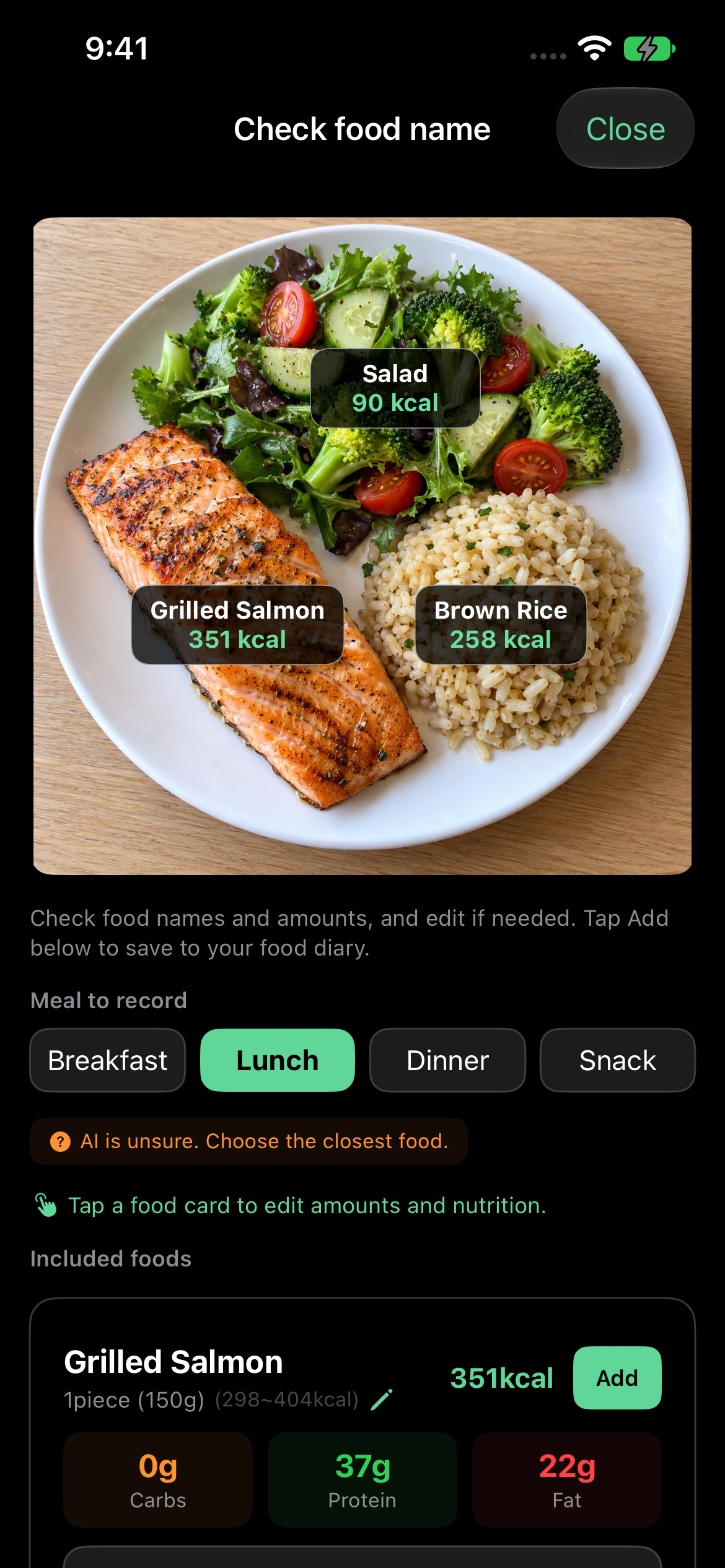
Check calories and carbohydrates, protein and fat from a food photo. You can edit the estimated results yourself and log them to the meal you ate.
AI nutrition information is an estimate. Please check the actual food and amount and edit as needed.
A LITTLE EVERY DAY
From the day you start logging to the moment you look back a few days later. Take a look through a hypothetical usage example.
Enter today's measurement yourself, or import it from a health app you've allowed.
Check and edit the photo analysis results, then save them to the meal you ate.
Record the dates and doses you actually took. It does not instruct you on your next dose.
Look back on weekly diet statistics and weight and medication logs by date. Missing logs are not treated as your actual intake.
Some features, such as weekly and last-4-weeks analysis, are provided with PRO or a valid trial. Check the app for the detailed scope.
YOUR RECORD, YOUR PACE
Available after separate consent to health information processing. See the Privacy Policy for consent management and data processing information.
You can organize your actual medication history for supported medications such as Mounjaro and Wegovy. The app does not provide prescriptions, dose changes or effect judgments, and does not replace consultation with medical professionals. It is not an app affiliated with the manufacturers.
Meals and snacks you haven't logged are not included. Logged calories may differ from your total daily intake.
Yes. Food search and manual entry are supported. Foods you eat often can be logged again from recent foods or favorites.
Food names, calories and nutrition information are estimates. They may vary depending on ingredients, cooking methods and the actual amount eaten. Please check the analysis results and edit them yourself before logging.
Yes. You can log just meals and weight. Medication logging is an optional feature for recording actual dates and doses. It does not provide guidance on medication effect, diagnosis or dose changes.
On supported devices, you can import it if you allow weight reading from the Apple Health app or Android Health Connect. Separate consent is required, and Kkirok does not write to or delete the original data in the health app.
The free features and PRO differ in things like the number of analyses and the viewable period. Some features, such as weekly and last-4-weeks analysis, are available with PRO or a valid trial. Please check the app and each store for current prices, trial eligibility and subscription terms.
You can view, edit and delete your meal logs in the app. The scope of deletion upon withdrawing health information consent and deleting your account is described in the Privacy Policy. Store subscriptions must be canceled separately.
START YOUR RECORD
Start with a single meal.
Includes in-app purchases · Check the terms of use in the store